Looking for a TI-84 alternative? Read this first.
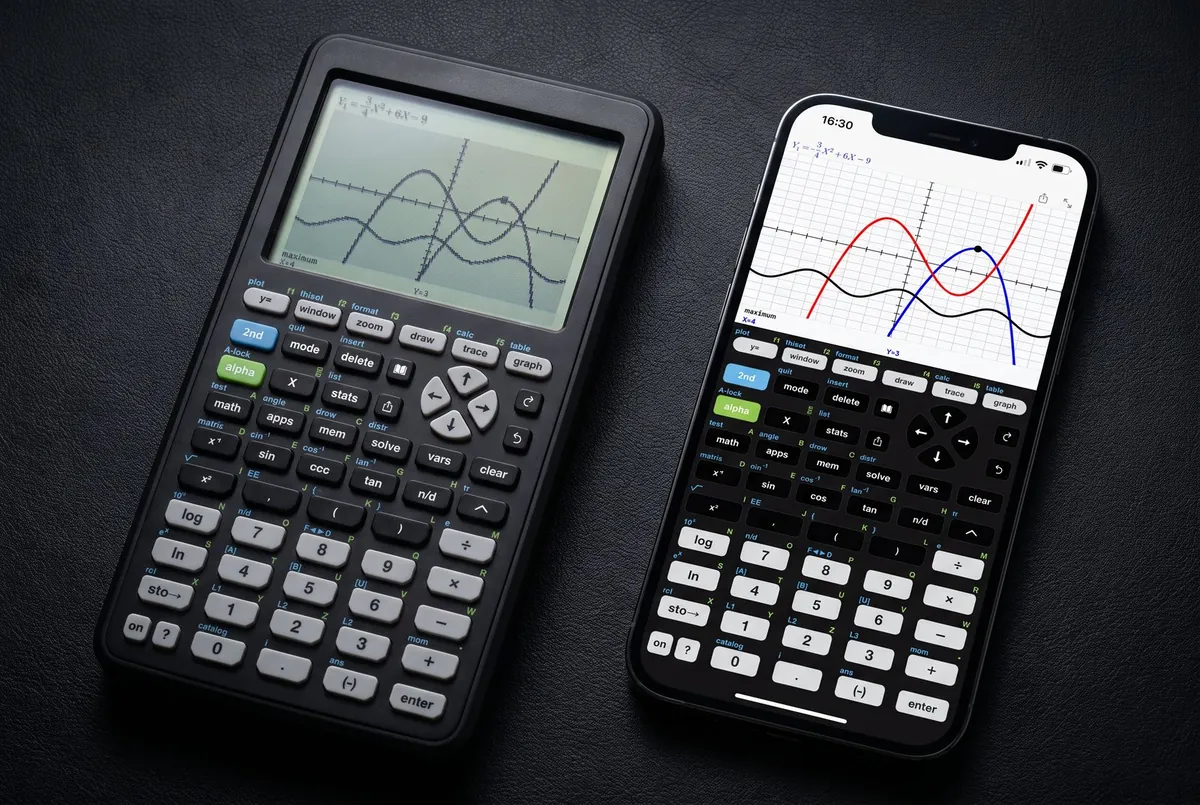
Taculator 84 is an independent graphing calculator app intended for use with the TI-84 Evo and TI-84 Plus CE. For homework, classwork, and studying it works as an easy replacement when a physical Evo, Plus CE or Casio handheld is not nearby: overhauled 2026 menus, MathPrint input, same keypad logic, no ads. Where it doesn't replace the handheld: standardized tests like the SAT and ACT, where phones aren't allowed. Both halves of that sentence matter, so here's the full picture.
Last updated: September 2026
Feature for feature
| Taculator 84 (app) | Classroom handheld TI-84 Evo, TI-84 Plus CE, Casio fx-CG50, HP Prime & similar | |
|---|---|---|
| Price | Free to download; full feature set via an affordable one-time or subscription upgrade (Taculator Pro) — incl. a free trial. Completely free for schools | $85–160 new depending on the model, $40–70 used |
| Key layout & syntax | Intended for use with the TI-84 Evo and Plus CE: y=, window, zoom, trace, graph, overhauled 2026 menus, MathPrint input | Every brand has its own — TI's 84 layout, Casio's menu system, HP's apps |
| Course coverage | Pre-Algebra, Algebra 1 & 2, Pre-Calculus, Calculus, Statistics — incl. matrices, regressions, distributions, solver | Same |
| Graphing speed | Instant, sharp, high-resolution | Renders pixel by pixel, low-resolution screen |
| Always with you | Yes — it's your phone | Forgotten, lost, or out of batteries regularly |
| Homework & classwork | Fully covered | Fully covered |
| SAT / ACT | Not permitted — phones are banned at test centers | Approved models permitted (the digital SAT also has a built-in calculator in its testing app) |
| Batteries | Charges with your phone | AAA batteries or built-in rechargeable (model-dependent) — one more charger to carry |
Taculator 84 is an independent app intended for use with the TI-84 Evo and TI-84 Plus CE — it is not affiliated with, sponsored by, or endorsed by Texas Instruments, Casio, or HP. TI-84®, TI-84 Plus CE and TI-84 Evo are trademarks of Texas Instruments Incorporated; Casio and HP product names are trademarks of their respective owners, used here only to identify the handhelds being compared.
Comparing calculator apps instead? The best TI-84 calculator apps, compared →
So which one should you get?
Is Taculator 84 exactly like a TI-84?
For daily homework, yes in the ways that matter. Taculator 84 is intended for use with the TI-84 Evo and TI-84 Plus CE: same keypad logic (y=, window, zoom, trace, graph), overhauled 2026 menus, MathPrint input, same course coverage. Honest differences: it's an independent app, not a TI product and not an emulator running the TI operating system; graphs render instantly in high resolution instead of pixel by pixel; and as a phone app it isn't permitted on standardized tests, where the handheld still is.
You mainly need it for homework and class
Get the app. It does everything the handheld does for daily work, you can't forget it at school, it's free to download, and even the full version costs a fraction of a new handheld. If a test later requires a handheld, borrow a school loaner for that day.
You're preparing for the SAT or ACT
You'll want access to an approved handheld for test day — a used one or a school loaner is fine. Many students still do their daily practice on the app (it's always with them) and use the handheld enough to stay familiar with it before the test.
You're a school outfitting iPads
The app is the economical option by far: for schools and districts, Taculator 84 is completely free through Apple Custom Apps — a class set of handhelds costs thousands. How schools get Taculator 84 for free.
Familiar in the first minute.
Intended for use with the TI-84 Evo and TI-84 Plus CE. Overhauled 2026 menus, MathPrint input, no ads.